
FAQ's
Our most common questions :
The FAQ opens automatically below; please scroll down to read it.

Tenancy FAQs
General
- What to do in an emergency?
- Isolate the house water supply using the valve under the kitchen sink – check the kitchen tap to make sure the water is off.
Note: if you fail to do this you will be charged for water damage.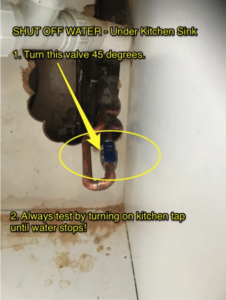
- Call the Maintenance Manager on 07472930049 and explain that you are a tenant of Warner Residential. If you cannot get through call an emergency plumber [we’ll reimburse you ASAP] – use yell.com
- Ensure all rooms are open and DO NOT go anywhere until they arrive onsite.
Locked out – Immediate Action.
If you are locked out of your property because your keys are inside lost or damaged it will be your own responsibility to access the property again. First contact one of your flatmates to see if you can borrow the key, or alternatively you can call a locksmith at your own expense. Emergency locksmiths can be found on https://www.yell.com. You may reach out to see if the property maintenance manager is available, but you will be charged the standard call-out rate – see our standard charges. - Isolate the house water supply using the valve under the kitchen sink – check the kitchen tap to make sure the water is off.
- Where do I view all my property licencing and certification?You can view/download all the licences/certifications HERE.
Note: it is your responsibility to check here every 14 days for any changes/updates.
- How do I contact you?You use the contact form HERE
- Our standard charges
Standard Charges
1) As per clause 25 & 26 of your tenancy agreement you may be charged for any excess waste found in rooms or in common areas at checkout, you may remove the items at the time or a £150 charge will apply for waste removal.
2) Excess waste found in common areas may be charged to all tenants equally to cover the cost of handling and disposal.
3) Lost/Damaged Keys – A £150 charge per set for lost keys or failure to return keys at the end of your tenancy will apply.
4) Locked out and require emergency assistance from property maintenance £200 per call out.
5) Room changes can be requested after the first six months of a tenancy and are at the sole discretion of the company – a fee of £250 applies to cover room inspections and new inventories provided by our agent, Ocean.
6) Leaving before the end of the tenancy term – £350 to cover room inspections, new inventories, additional marketing and viewings provided by our agent, Ocean.
- Swapping rooms
Swapping Rooms
As per your contract room changes are only allowed after the first six months of a tenancy and are at the sole discretion of the company – a fee of £180 applies to cover room inspections and new inventories provided by our agent, Ocean.
To request a room swap please contact Admin through a General Enquiry.
- Internet & Cable TVInternet and cable TV Internet and TV services are provided by Virgin Media. To get technical support from Virgin or details on your Internet Service please refer to the notice board in your house.
97 Raleigh Road –
https://www.dropbox.com/s/vhyn483zw5s050r/2023_BroadBandTechSupportRaleigh.pdf?dl=0
3 South Street –
https://www.dropbox.com/s/ojw10o4slculhlr/2023_BroadBandTechSupportSouthStreet.pdf?dl=0
- What to do if the power goes outWhat to do if the power goes out
There are only two reasons why the power would go out in the property:
1) If There is a local power cut, check with your neighbours and contact the national grid to report the problem or find more advice. https://www.nationalgrid.co.uk/power-cut-information
2) The trip switch on the electrical consumer unit has been activated.
If the power goes out in the property could you please make the following basic checks before you contact us to avoid unnecessary callouts and possible charges.
Resetting a trip switch If your lights or power go off, it means your trip switches are working properly.
You can find out what caused the problem and sort it out quite easily.General advice
This advice only applies to modern consumer units. Modern electric circuits are fitted with circuit breakers called trip switches. If a fault develops, a switch is tripped and the circuit is broken. Make sure your hands are dry before you touch electrical fittings and never touch fittings if they are wet. Never touch the electricity company’s fuse and seals. All of the fuses or trip switches are located in the consumer unit. Some consumer units have buttons rather than switches. The consumer unit may be next to the electricity meter (unless the meter is in an outside cupboard). A trip switch or button usually operates because:
• There are too many fittings or appliances on a circuit and it has been overloaded.
• An appliance is faulty or has been misused, such as a kettle has been over-filled or a toaster not cleaned.
• Water has leaked into a circuit or spilt onto a plug.
• A light bulb has blown.What to do to reset a trip switch:
• Open the cover on the consumer unit to expose the trip switches/buttons.
• Check which switches/buttons have tripped to the OFF position and which rooms (circuits) have been affected.
• Put these switches/buttons back to the ON position.If the trip goes again: It is probably caused by a faulty appliance or light.
Find out which circuit is being affected and which appliance is causing the problem:
• Check all the rooms and note which set of lights or sockets is not working.
• Unplug all appliances on that problem circuit.
• Switch the ‘tripped’ switch to the ON position (press in if it is a button).
• Plug in the appliances or switch on each light one at a time until the trip goes again.
• Do not use adaptors when testing appliances.If an appliance belonging to you is faulty, dispose of it or leave it unplugged and get a qualified electrician or service engineer to check it.
If an appliance provided by us or a wall/ceiling light is faulty, keep it switched off (put some tape over the switch) and contact us or British Gas Homecare – see FAQ on how do I get my appliance fixed. - Cleaners & cleaningCleaning
Where a cleaning service is provided tenants are responsible for washing and putting away their own dishes and keeping the shared kitchens and kitchen sides clear so that the cleaners can access all surfaces. Tenants are also responsible for putting their own waste and recycling in the containers provided.
Cleaners will take the containers out for collection, tenants must bring the containers back in once emptied.
To report a cleaning concern please contact admin through general enquiry
- Waste & recycling general wasteWaste & Recycling General Waste and Recycling Services are provided by Bristol City Council and their contractors. To find out what your waste and recycling schedule is use the online calendar at https://www.bristol.gov.uk/residents/bins-and-recycling/bins-and-recycling-collection-dates
Maintenance
- How often is routine maintenance and how do I report it?Routine maintenance is every two weeks – please contact us HERE
- How do I get my appliances fixed?
Please note: there is a charge for incorrect or misuse use of this service – see note below.
You can book a service call in order to fix your appliances. You will need to discuss amongst yourselves who will let the service engineer in – we do not provide a wait-in service ( this is something you need to arrange with your housemates).
Please call British Gas on 0333 200 8899
Choose Option 1 – I have a question about heating and Homecare
It will ask you for an account number, you don’t need it, just press * (star) to skip to the next question. You may have to do this 3 times.
It will ask you for a phone number, you don’t need it, just press * (star) to skip to the next question.
It will ask you to say what you want to talk about – please say Homecare
It will ask you what you want to do – please say book a repair
Follow the prompts to choose the appropriate appliance/service type.
You will be put through to an agent, to book your repair you will need the address of the property including the postcode and the landlord’s name which is Chris Warner.
Lines are open 24/7
Note: if you contact us and they have no record of your call (all calls to the service centre are logged) – we will raise an administration charge of £75.00 to you (to cover the additional administration involved). It is important to remember that we pay for and provide this service at our own expense for your comfort and safety and we expect you to use it correctly.
- Defrosting freezersDefrosting Fridges/Freezers Fridges and freezers can be damaged if they are not defrosted when required. If your fridge or freezer is building up ice it is your responsibility to defrost it fully.
Do not force drawers and doors closed as this can cause damage. Please do not increase the thermostat settings as this can cause over-freezing. If the problem persists log a maintenance call before the issue becomes too severe.
- My fridge has water poolingWater Build up in the back of the fridge Most fridges are designed to deal with normal condensation through a small drain at the bottom/back that should drain and keep your fridge frost-free, controlling the moisture created naturally by the chilling process.
There are a couple of simple things to look for if you notice unwanted water inside your fridge. Drainage problems: Most fridges have a drain. Look inside your fridge for a “V” shaped channel with a small hole.
This hole leads to a tube and a small pan which sits on top of the compressor. The defrost cycle causes water to run into the channel, down the tube, and then it generally evaporates with the heat of the hot condenser. However, if that tube is clogged with food crumbs, you will have to clear it to get back to a normal mode of operation. A toothpick, straw, cotton bud or pipe cleaner can be used. Do not use tissues or kitchen towel as this will block the drain.
Condensation Problems
Warm air can get into your fridge causing water droplets to form on the back wall or ceiling.
Ask some of the following questions to determine the cause:
• Was food warm when you put it into the fridge? Make sure it’s at room temperature after cooking before putting it in the fridge.
• How level is your fridge? Often, notching the front screws up one turn will keep condensation moving to the back drain.
• What temperature is your fridge set on?Cold air is generally dryer. However having the temperature set too high can cause an imbalance.
• Have you left enough space at the back of the fridge to allow correct drainage or are your food items touching the back wall?
Keeping a clear space will allow the drains to work correctly.
• Does the door shut securely and is the rubber gasket forming a complete seal? Check by closing the door on a bank note. If you can pull it out without a problem, the seal may be letting warm air in and could require replacement. First check if the seal is clean, if not please clean the fridge door and seal then try again.If the problem persists please raise a maintenance request via the website, confirming you have made the seal test and you believe it may need replacing. Always close the fridge door as quickly as possible after opening it. Leaving the door open allows warm air to enter and increases the possibility of condensation.
REMEMBER:
• Make sure that your fridge is clean inside and out
• Check all seals are working properly on the door
• Ensure the temperature is set between 0 – 5 degrees Centigrade (according to the Food Standards Agency).
Checking In or Out
- Check in and referencingReferencing Process
In order to check in you must provide a suitable employer reference – this can be done by filling out our reference form.
We ask that you inform your referee and follow up after a couple of days to make sure they have done as requested. You should allow at least five business days for us to complete the referencing process. You will be contacted on completion.Checking In – how the process works
Once references are complete our agent will be in touch with you in order to arrange your check-in date. They will meet you at the property and review the inventory and contract paperwork.
Our agent is Ocean Lettings Southville,
Tel: 0117 941 7010 Email: southvillelettings@oceanhome.co.ukOcean provide check-in and check-out services only, for general enquiries during your tenancy please get in touch with admin or maintenance, as appropriate.
Once your references are successfully completed Ocean will contact you to agree your check-in time and day.
To check in you will need –
1) 2 months rent
2) 2 forms of IDOn the day you will be given/need to complete the following –
1) Complete the HMO license agreement
2) Complete the bank standing order form
3) Receive a set of keys
4) Receive a copy of the condensation fact sheet
5) Receive a copy of the contact procedure
6) Receive a copy of the recycling procedures
7) Receive a copy of the gas safety certificate
8) Receive a copy of the EPC certificate
9) Receive a copy of the government leaflet on how to rent
10) Receive a copy of the water shut-off procedure.
11) complete the room and communal inventories.If you have any questions about this process or references please contact our admin team.
- DepositsDeposits when you check-in
Your deposit will be equal in value to 1 month’s rent Once you complete your check your deposit will be held by the Deposit Protection Service on your behalf. We will forward a copy of your deposit certificate, the prescribed information and the standard terms & conditions of the service to you once we receive the funds from our agent, Ocean and process your deposit. For more information go to https://www.depositprotection.com/
Deposits when you check out
Once we receive your completed inventory from our agent, Ocean and check for any damage or excess waste we will process your deposit return, as per your contract this will be completed within 28 days of the end of your tenancy.
- Giving notice to leave & check-outNotice Period – What You Need to Know
To give notice, you must provide at least TWO full calendar months’ notice on or before your final rent payment date, with one month’s cleared rent. Check your contract start date and terms for details.
Once your intention is submitted, we’ll review your contract and email confirmation of acceptance. Your notice period will start from your final rent payment date.Example 1:
Move-in date: 25th April
Notice given: 18th April → Notice starts 25th April [final rent payments due 25th April & 25th May]
Move-out window: 25th May – 24th JuneExample 2:
Move-in date: 25th May
Notice given: 26th May → Notice starts 25th June [final rent payments due 25th June & 25th July]
Move-out window: 25th July – 24th AugustTip: Check your contract for exact terms.
Check-Out Process
Once we have reviewed your contract, we’ll confirm acceptance along with your final payment date and amount.
Note: The accepted notice will be from your contract start date.You’ll need to contact our agent, Ocean, to book a check-out within 30 days of your accepted notice date.
Check-outs must be done in person, during normal office hours: Monday to Saturday, 9:00 AM – 5:00 PM.
Note: The agent does not manage the property or accept written notice – they only provide a check-out inspection and key holding service.Important – Before You Leave:
Remove all your belongings and rubbish from the property.On your departure day, a text will be sent to your housemates asking them to check for any items you’ve left behind; otherwise, they will be charged.
You will be charged:
Individually, for anything left in your room.
Collectively with other tenants for anything left in shared areas (e.g. rubbish bins, kitchen, hallway).